Young Professional
You know you should budget but have no idea where to begin. Budgley's templates do the thinking for you.
Budgley makes it stupidly simple to see where your money goes, plan ahead, and actually stay on track — without spreadsheets, guilt, or a finance degree.
Most budgeting apps connect to your bank and show you what already happened. Budgley is different on purpose. Every time you log an expense, you pause and ask: How much is left? Am I on track? That 5-second check-in is the moment that actually changes how you spend. We call it the Journal Moment — and it's why Budgley works when other apps just… collect dust.
Your bank credentials stay with your bank. Your awareness stays with you.
You know you should budget but have no idea where to begin. Budgley's templates do the thinking for you.
Groceries, utilities, kids' stuff, subscriptions — you need to see it all in one place without it becoming a second job.
One budget, two people. Share access with a secure code and stay on the same page — financially and otherwise.
Track business deductions as you go so tax season doesn't destroy you.
From first setup to daily habit in four simple steps.
Choose a budget that fits your life — or start from scratch.
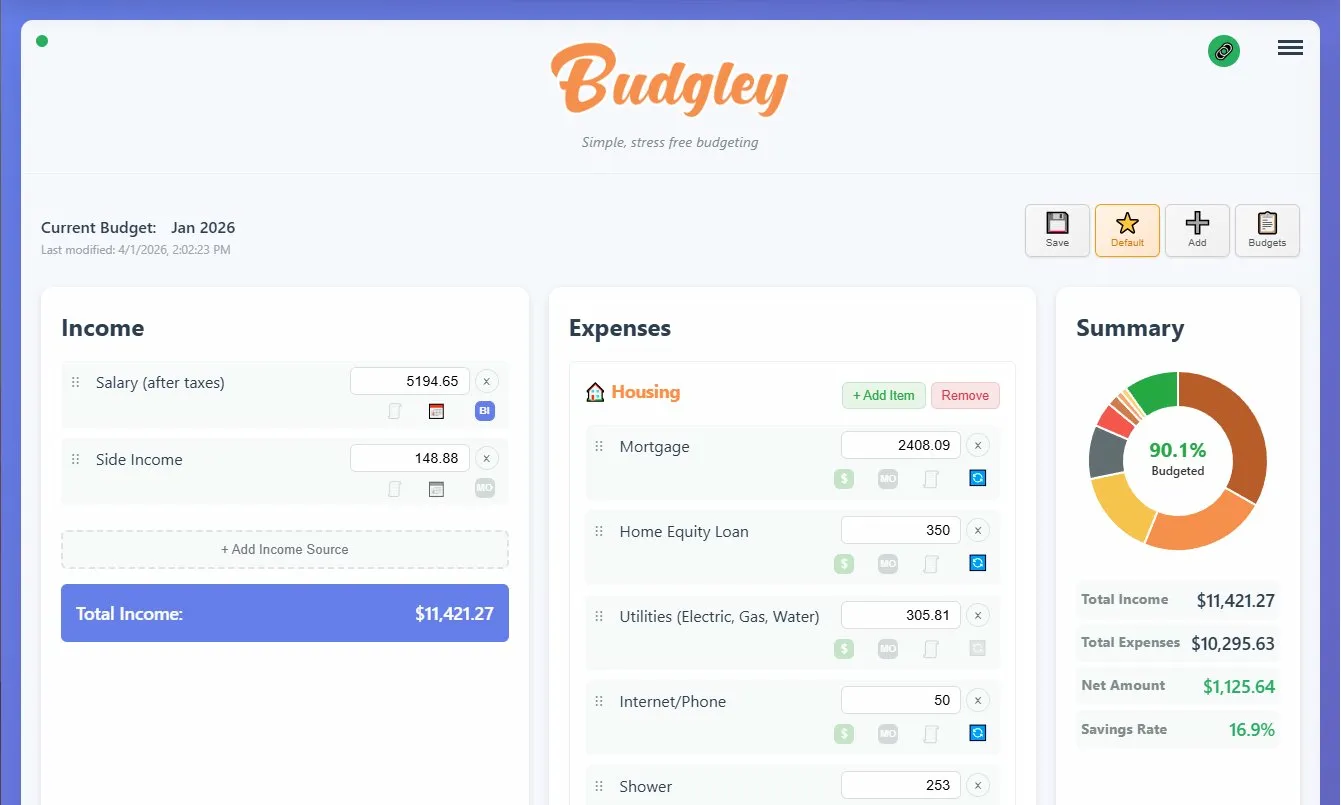
Adjust categories, add recurring bills, and set limits. Math built in — just type rent + utilities right in the field.
Log expenses from your phone in seconds. Budgley shows what's left in each category so you always know where you stand.
Upload or paste a bank statement to catch anything you missed. Review, approve, done — your budget stays honest.
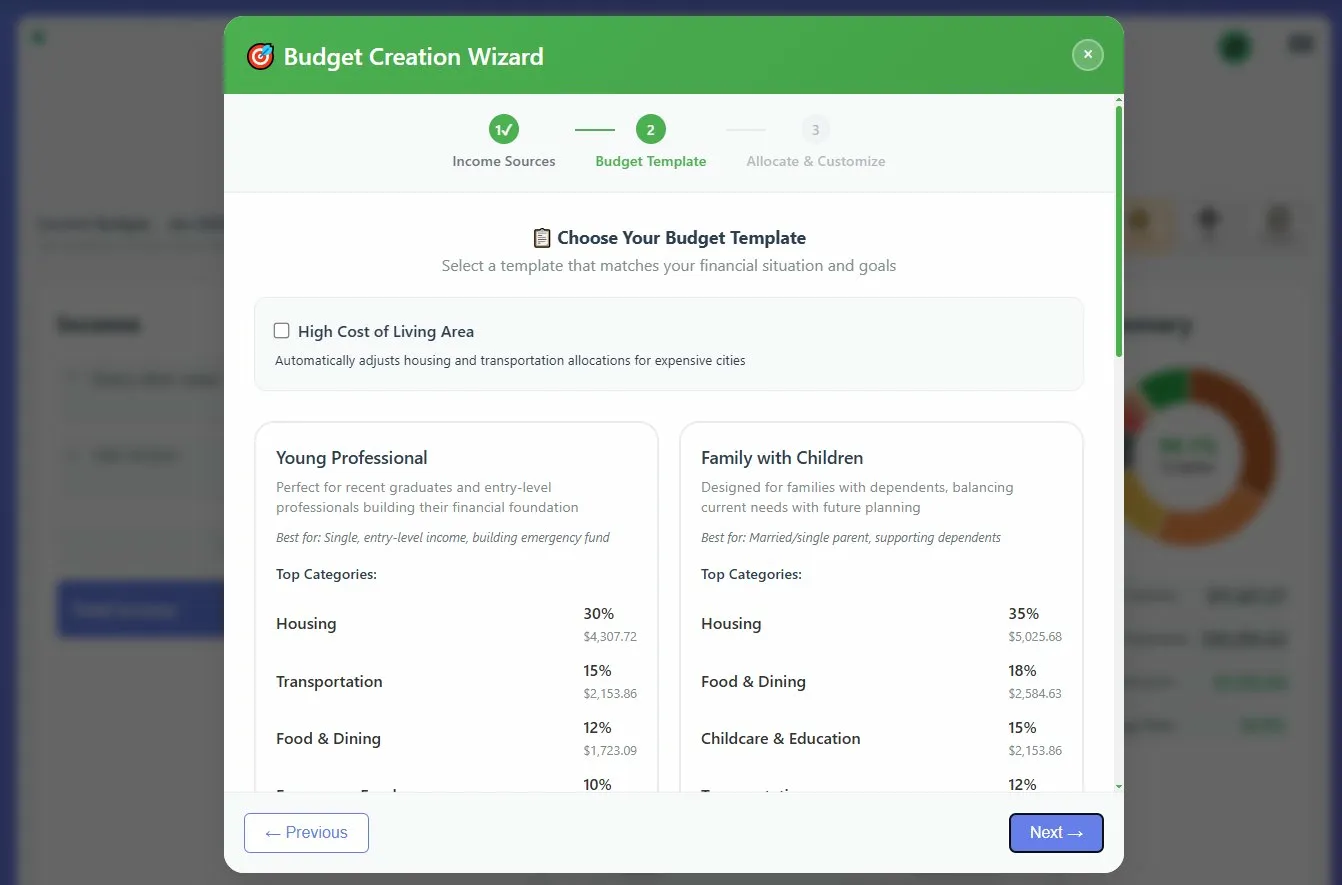
Not sure where to begin? Budgley comes with pre-built budget templates for real life stages — 'Young Professional,' 'Family with Children,' and more. Each template has smart category suggestions and percentage-based allocations already filled in. There's even a 'High Cost of Living Area' modifier that adjusts your housing and transportation automatically. Customize from there, or use it as-is.
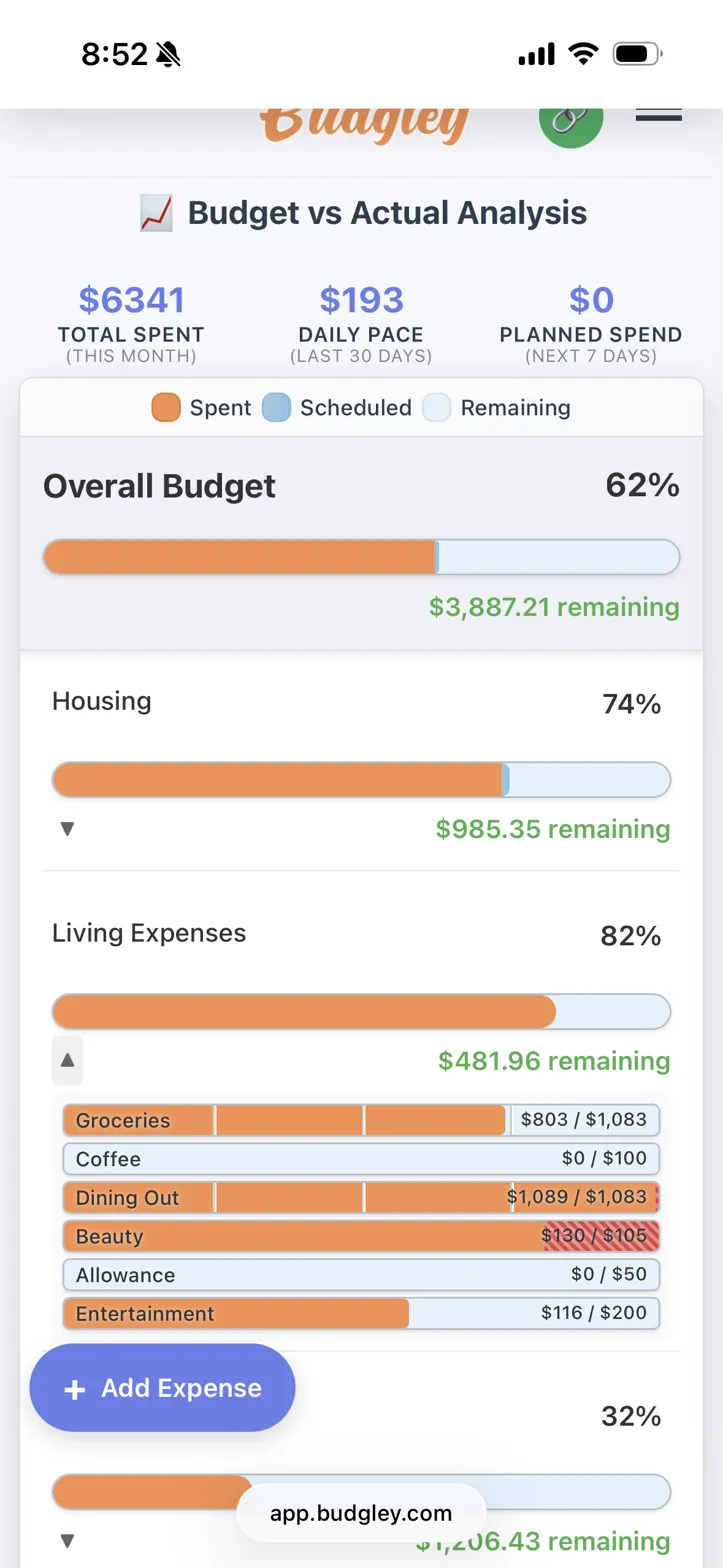
Set budgets by category, then watch your progress in real time. Budgley shows what you've spent, what's scheduled, and what's left — so every purchase is a decision, not a surprise.
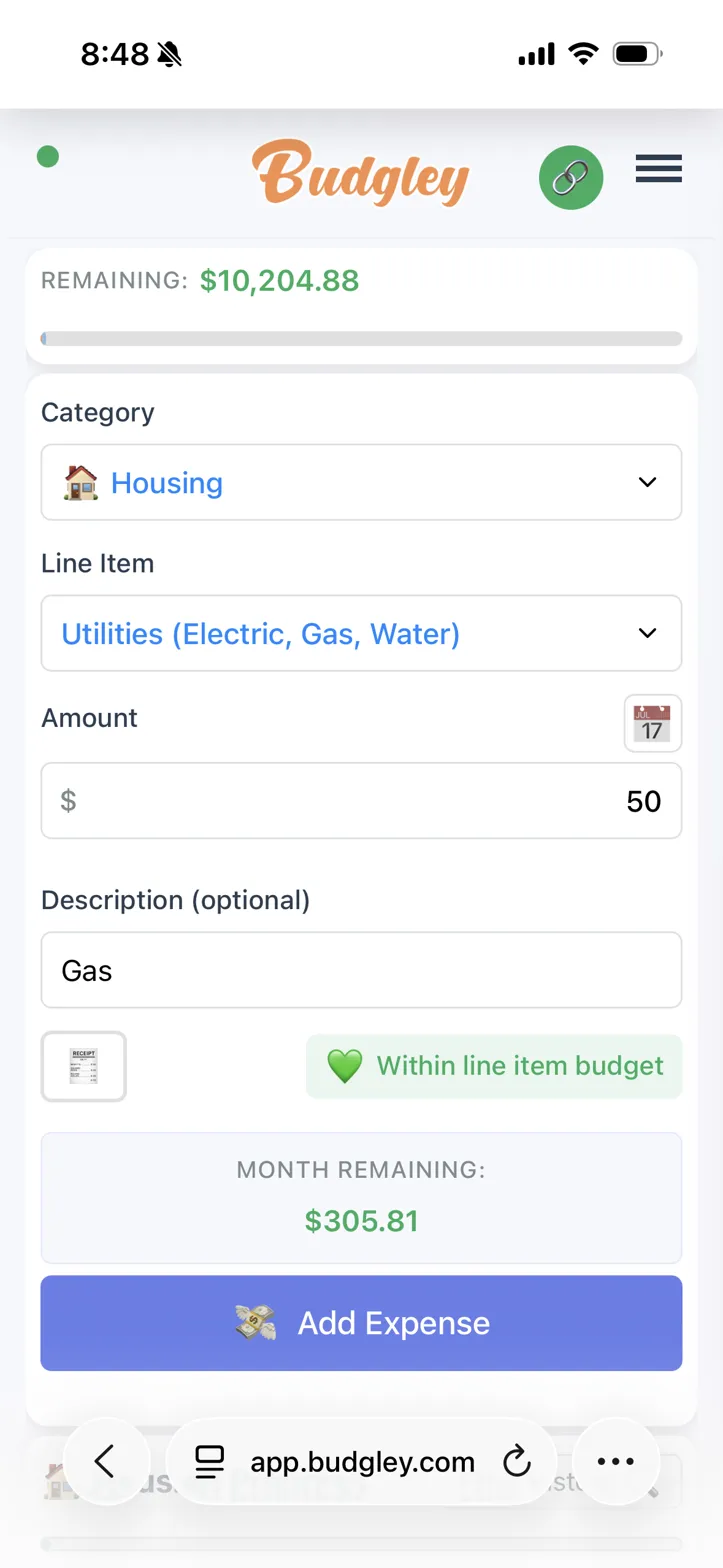
Pick a category, type the amount, done. Budgley instantly shows how much you have left in that category this month — so every purchase becomes a moment of clarity, not just a data point. Need to calculate a tip or split a bill? Every number field supports basic math — just type 45.50 * 1.2 and Budgley does the rest.
Upload a bank statement or paste your transactions, and Budgley compares them against what you've already logged. Missed something? It surfaces the gaps for you to review, categorize, and approve — so your budget stays honest without becoming a chore.
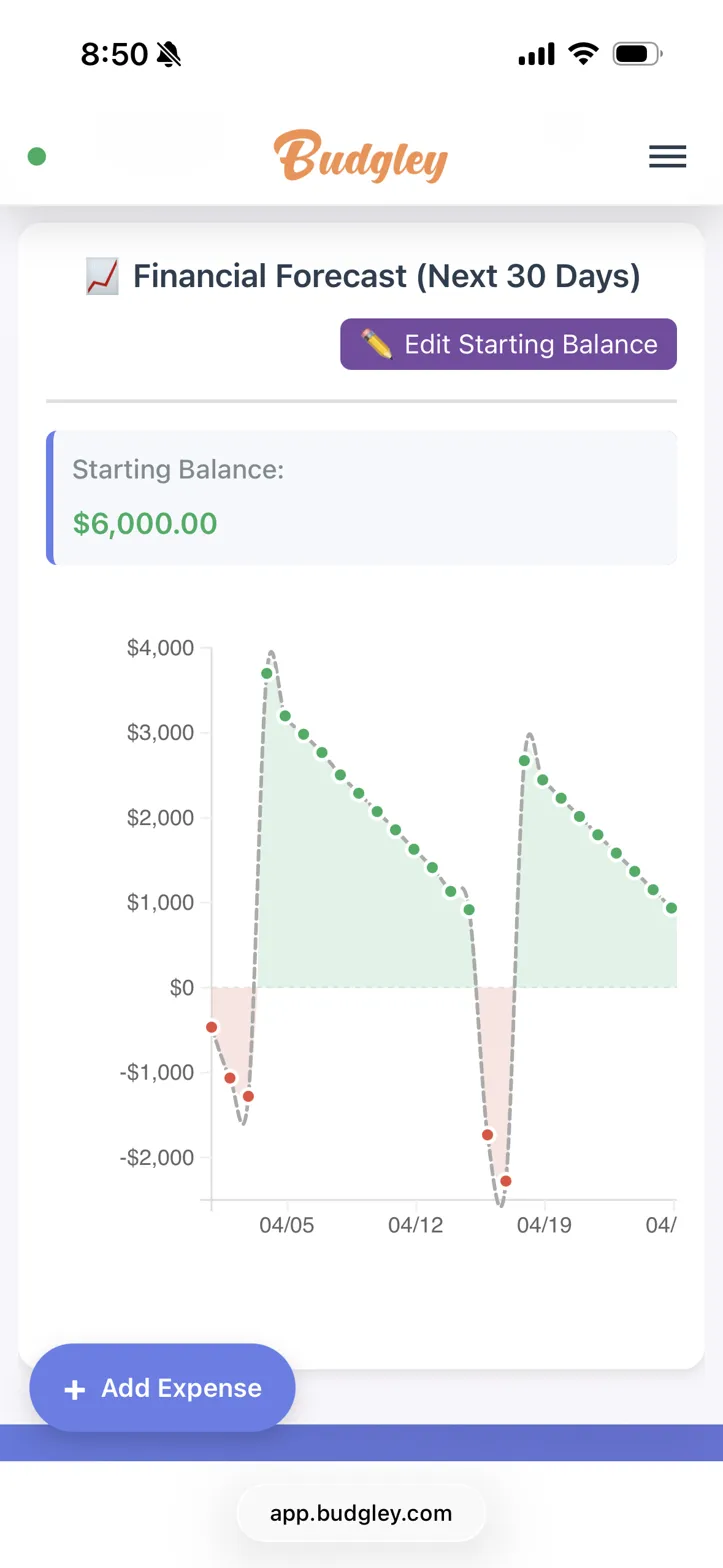
Budgley projects your balance forward based on your income, bills, and spending patterns. Spot cash crunches before they happen — and plan around them.
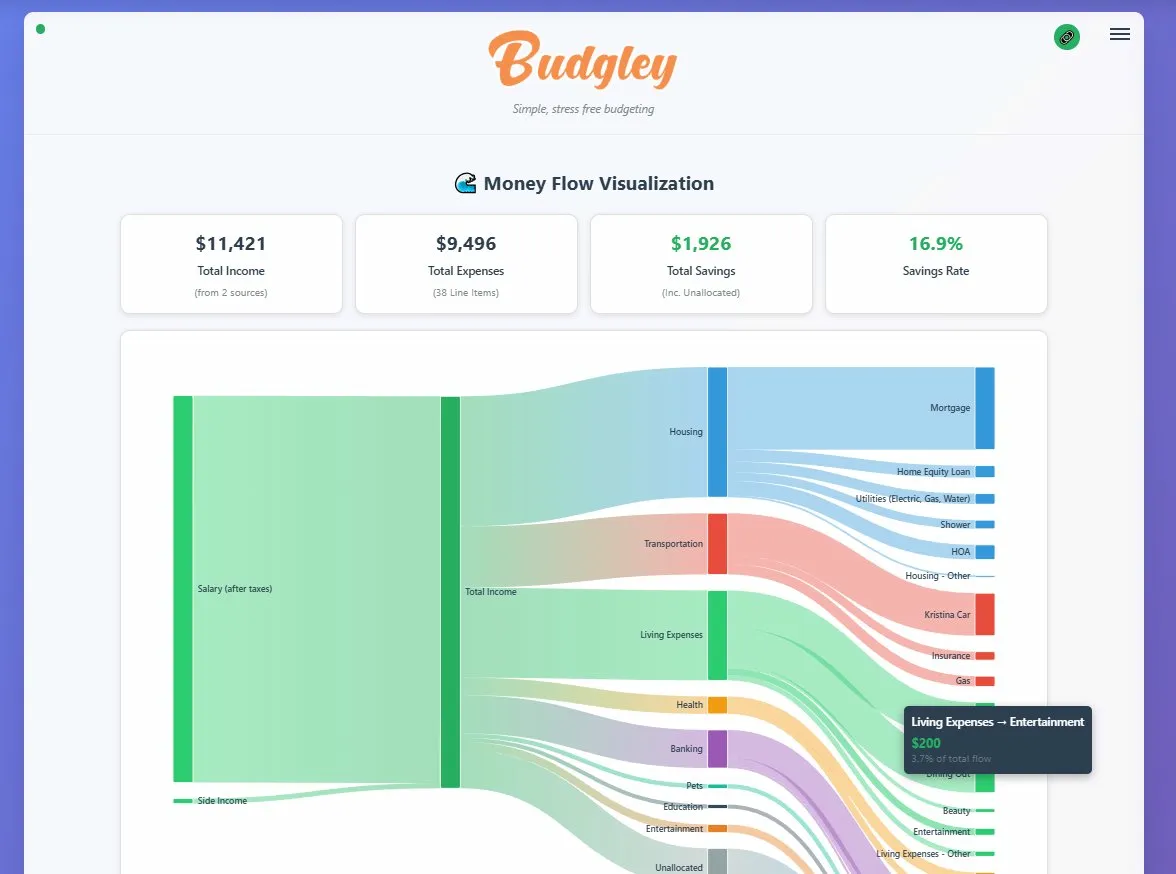
A visual flow chart that shows exactly how your income splits across housing, food, transportation, and everything else. Hover over any flow to see the exact dollar amount and percentage. It's the big picture you've been missing.
Plus everything else you need.
Auto-log fixed bills. One-click log variable ones. Monthly, bi-weekly, weekly — all on a calendar.
Plan a big purchase or trip — Budgley breaks it into monthly savings chunks automatically.
Share with a partner via secure one-time code. One budget, two people, zero syncing headaches.
Track spending and savings rate over 3, 6, or 12 months. See the patterns. Stay motivated.
Earn Bronze, Silver, Gold, and Platinum badges for hitting budget goals. Good habits deserve trophies.
Flag expenses as deductible when you log them. Come April, your list is already done.
Use the desktop view to set up your budget, compare categories, and do your weekly true-up. Then pull out your phone at the store to log expenses and check how much room you have left. Same account, same data, designed for how you actually live.
Import a few months of bank statements and let Budgley analyze your real spending patterns — suggested categories, realistic amounts, and recurring expenses identified automatically. Your statement data is processed once and never stored.
$4.99/mo — Everything included.
Enter your card to start — you won't be charged for 30 days.
We'll send you a reminder before your trial ends. Cancel anytime from settings — no phone calls, no guilt trips.
Budgley is a web app that works beautifully on your phone's browser — no app store download needed. Just go to app.budgley.com and you're in. Tip: add it to your home screen for one-tap access, just like a native app. It works great on desktop too — most people plan their budget on a laptop and track expenses from their phone.
No — and that's by design. Budgley uses manual entry because the act of logging each expense is what builds real awareness. We call it the 'Journal Moment' — that quick check-in where you see how much you have left and decide if a purchase is worth it. Apps that auto-sync your bank show you what already happened. Budgley helps you make better decisions before you spend. Your bank credentials stay with your bank.
That's what the weekly true-up is for. Upload or paste a bank statement and Budgley finds the gaps — transactions you didn't log. Review them, approve the ones you want to add, and your budget stays accurate. The bank data is processed on the spot and immediately discarded — nothing is stored.
You don't have to! Budgley has pre-built templates for common life stages — 'Young Professional,' 'Family with Children,' and more — with a 'High Cost of Living Area' modifier if you're in an expensive city. Pick one, tweak the numbers, and you're budgeting in minutes.
Yes! Generate a secure one-time code and share it with anyone you want to give access. They'll see the same budget you do.
After 30 days, your subscription begins at $4.99/month. We'll send you a reminder before that happens so there are no surprises. And hey — that's less than a single coffee run.
So your transition is seamless if you decide to keep using Budgley. You won't be charged a cent for 30 days, and we'll remind you before your trial ends. If it's not for you, cancel in two taps from settings — no phone calls, no hoops.
Yes — flag any expense or budget line item as tax deductible. When tax season rolls around, you've got a ready-made list. No shoebox required.
Budgley runs on Google Firebase with industry-standard encryption. Your data is never sold or shared with third parties. Bank statement imports are processed once and immediately deleted — nothing is stored.
Absolutely. No contracts, no cancellation fees. Cancel from your account settings in two taps. We mean it.
Join the people who stopped dreading their finances.
Start Your Free Trial30 days free · $4.99/mo after · Cancel anytime